 Audio Flashcards
 Peter from Audio Flashcards · 18 October 2026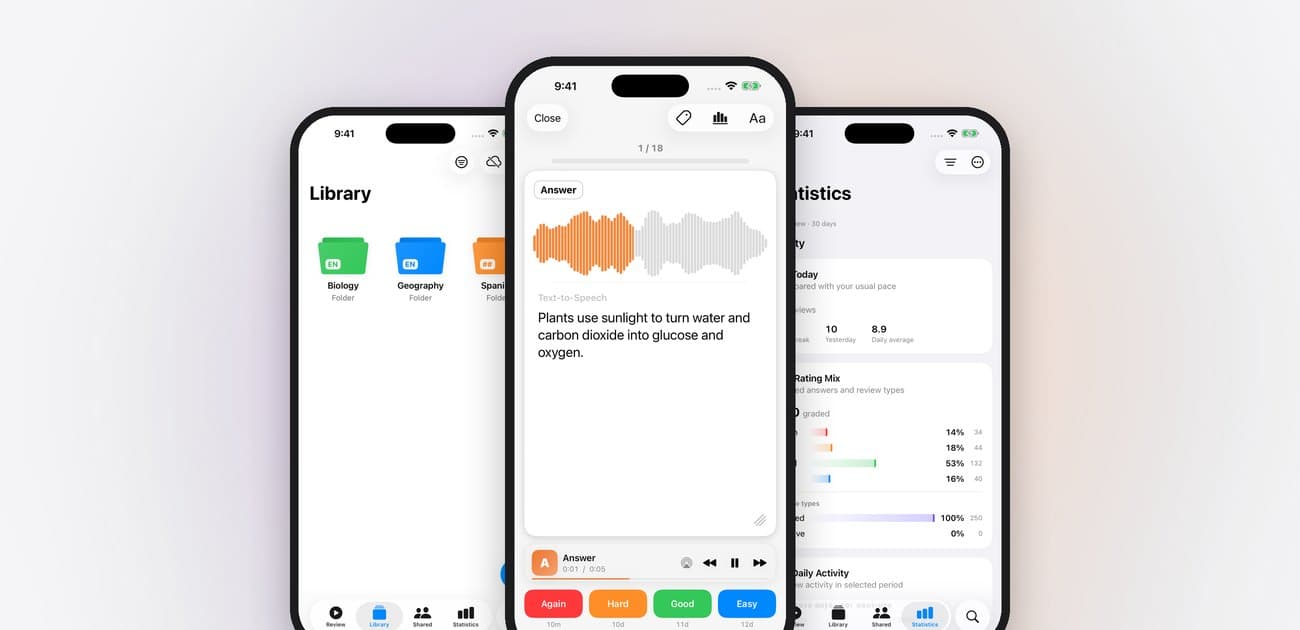
Audio Flashcards 2 is the biggest update since the app began. I rebuilt it from the ground up, separately for each platform, so it now feels like it belongs on your iPhone, iPad, Mac or Android phone instead of being one app squeezed onto all of them.
The idea has not changed. You hear a question, answer it in your head, hear the answer and say how well you knew it, so you can study on a walk, in the car or while you cook. Version 2 makes all of that faster, smoother and easier to do without looking at your phone.
Here is what it means for you.
Your cards come with you
Update the app and everything is where you left it: your folders, cards and recordings, your voices and settings, and your review history. There is nothing to export or import.
If you published collections on Marketplace, sign in to Shared Cards with the same email address you used before. Your collections are claimed automatically and appear under By Me.
Faster and smoother
Because each version is now built specifically for its platform, the app opens quickly, large libraries scroll smoothly, and audio starts the moment you press play. Reviews keep playing reliably with the screen off, which matters most when your phone is in your pocket.
It also makes the app much easier for me to look after, so I can fix problems sooner, and new features no longer have to wait until they work the same way everywhere.
Now on the Mac
For the first time there is a proper Mac app, with a sidebar, menus and keyboard shortcuts. It is the nicest way to build a deck: type with a real keyboard, import a spreadsheet, and let a voice read it.
- ⌘N makes a new card, ⇧⌘N a new folder, and ⌘I imports cards.
- ⌘R starts a review. During a review, 1 to 4 grade a card and Space plays or pauses.
Your library syncs between your Mac, iPhone and iPad through iCloud, so a card you make at your desk is ready on your phone for the walk home.
At home on your phone
Version 2 works with your phone instead of fighting it.
On iPhone and iPad:
- A Live Activity shows your review on the Lock Screen and in the Dynamic Island, with Again, Hard, Good and Easy buttons, so you can grade a card without unlocking your phone.
- Your headphones, your car and Control Center can play, pause and skip, just like music.
- Send audio to AirPlay or Bluetooth speakers right from the player.
- Your library lives in iCloud Drive as ordinary files, so it stays yours and syncs between your devices.
On Android:
- Reviews keep playing with the screen off, with controls in the notification and on the lock screen.
- Headphone buttons play, pause and skip.
- The app picks up the colours of your wallpaper on recent versions of Android, and uses the whole screen, edge to edge.
On every device you can grade cards out loud. Say again, hard, good or easy, in your own language, and rename any command to a word that suits you.
Shared Cards replaces Marketplace
Shared Cards is a new home for decks people make and share.
- Browse without an account. Look through the community's collections in the Shared tab, or on the web at audio-flashcards.com/cards.
- Listen before you download. Play any card in a collection first, so you know you like the voice and the questions before you commit.
- Get updates without losing progress. When an author fixes a mistake or adds cards, you can update your copy, and your review history stays exactly as it was.
- Share your own. Publish a folder from the app for everyone, or keep it private and send invitation links to just your class, team or study group.
There is already a good mix to explore: languages, music, medicine, wildlife calls and more, and authors have profiles where you can find their other collections.
And a lot more
- Smarter scheduling. A modern scheduler, FSRS, works out the best moment to bring each card back, using your whole review history. You can choose how much you want to remember.
- Better voices. Kokoro voices sound far more natural than built-in voices and run entirely on your device, so they work offline. You can also use Amazon Polly or OpenAI with your own account.
- Search inside your recordings. Once a recording is transcribed, search finds a card by the words you said, and those words light up as they play.
- Statistics show how much you review, how you grade, and how much you are actually remembering.
- Saved review sessions each keep their own cards, order, timing and playback settings, so your daily review and your hands-free commute are one tap each.
- Listening counts. Let cards play without grading and the app still spaces them out, so background listening does not repeat the same handful of cards.
- Getting Started walks you through your first card and your first review in a few minutes, inside the real app.
Get Audio Flashcards 2
Audio Flashcards is free with ads on the App Store and Google Play. A subscription or a one-time lifetime purchase removes the ads. If you already have one, it carries over to version 2; if it does not show straight away, tap Restore Purchases in Settings > Manage Purchases.
New to audio flashcards? How to make audio flashcards takes you from your first card to your first hands-free review.
Thank you to everyone who has used the app, sent feedback and shared their decks. Version 2 is built on what you told me. If something is not right, or you would love to see something added, open Settings > Contact in the app. I read every message.